How to Choose a Parent Communication App in 2026

A parent communication app for schools is one secure app where a school sends announcements, permission requests, absence notes, fee reminders, and private messages, and parents respond with a single tap. The best ones replace the WhatsApp groups, SMS, email, and paper forms that scatter school communication across five different places. Pick the right one and more parents actually see and act on what the school sends. Pick the wrong one and you have added a sixth channel nobody checks.
This guide is for school owners, principals, and IT or operations leads choosing a school communication app for the first time, or replacing a tool that is not landing with parents.
Here's what you'll learn:
- What a parent communication app for schools actually does
- Why schools move off WhatsApp groups to a proper parent school communication app
- The features that matter in a school messaging app (an 8-point checklist)
- How to judge whether parents will really use it
- How Schoolvoice covers each point
What is a parent communication app for schools?
A parent communication app for schools is software that gives a school one official channel to reach every family, and gives parents one place to receive and respond. Its core job is to carry the day-to-day traffic between school and home: notices, approvals, attendance, class updates, and private parent-teacher conversations, all in a single secure app instead of spread across WhatsApp, SMS, email, and printed slips.
It is not a consumer chat app and it is not a student information system. It works alongside your SIS: keep the SIS for records, use the communication app for the conversation. The value is reach and response. On average, schools reach about 86% of parents through Schoolvoice, and many reach 100%, so one official channel does what five fragmented ones cannot.
Parent school communication app vs a WhatsApp group: why schools switch
A parent school communication app gives the school control, privacy, and a record. A WhatsApp group gives you none of those. That is the whole reason schools switch.
WhatsApp groups were never built for schools. Teachers hand out personal phone numbers, anyone can message the whole group at 11pm, there is no record of who read a notice, and when a teacher leaves they walk away with every parent's number. A dedicated parent school communication app fixes each of these by design:
| WhatsApp group | Parent communication app for schools | |
| Teacher phone numbers | Exposed to every parent | Never shared; chat runs in-app |
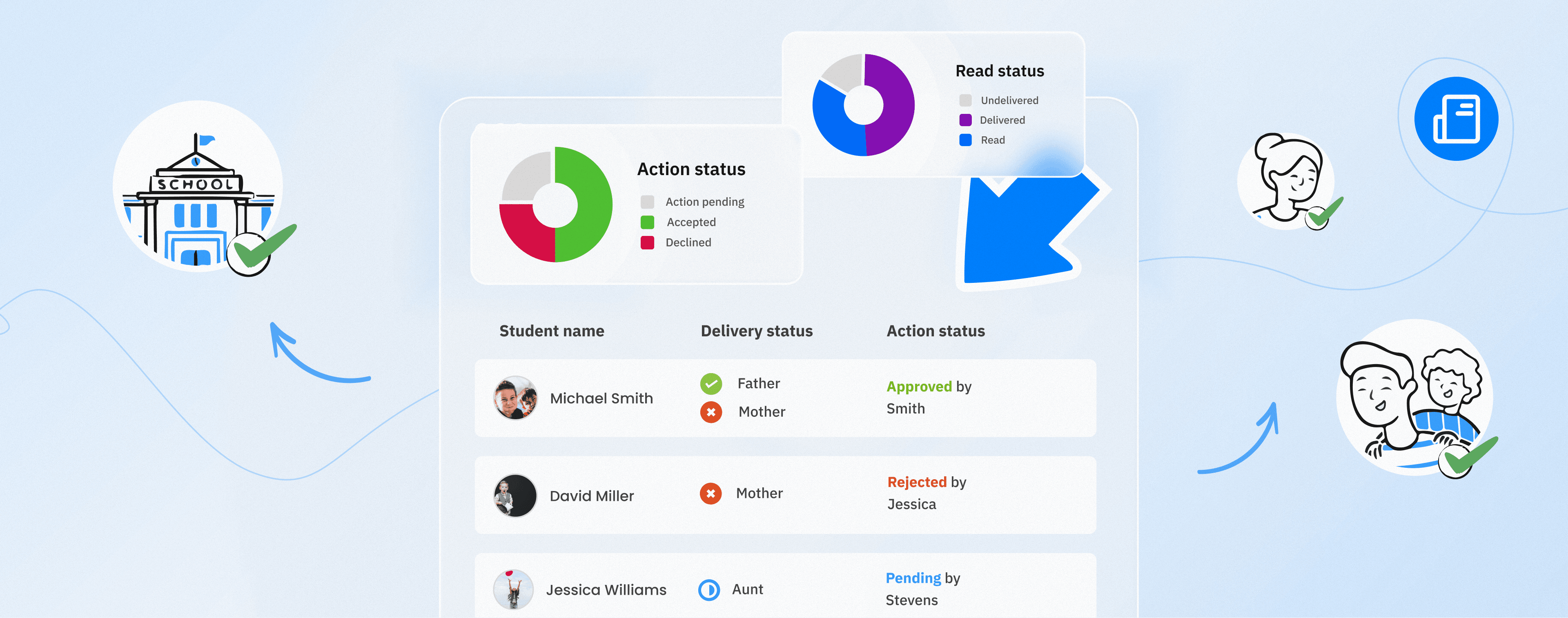
| Who saw the notice | No idea | Read and action reports per message |
| Control of the channel | Anyone can post | School decides who sends what |
| Record / oversight | None | Every message and call logged |
| A teacher leaves | Keeps all parent numbers | Access ends with the account |
Schools that want the human touch without the WhatsApp risks usually start with a secure WhatsApp alternative for schools and grow from there.
What to look for in a school messaging app: an 8-point checklist
The best school messaging app does more than push notifications out. It gets a response back and proves the message landed. Score any app you consider against these eight points.
1. One-tap actions, not just messages
A message that only informs is half a tool. Look for action-driven messages where a parent can Read, Approve, Acknowledge, or Reply in one tap. Schoolvoice calls these Actionable Messages, and they are the difference between "we sent it" and "we got a result."
2. Read and action reporting
You should see, per message, how many parents received it, read it, and acted, down to the individual student. Without reporting you are guessing. With it, you can send a smart reminder only to the parents who have not responded yet, instead of spamming everyone.
3. Private messaging without shared numbers
Teachers should be able to talk to parents one-to-one without handing out personal phone numbers. In-app chat keeps conversations professional, on the record, and safe, and it stays with the school when a staff member leaves.
4. Delivery that reaches parents who are offline
Not every parent has the app open, or even installed, on day one. A strong school messaging app has a fallback SMS that automatically texts only the parents who did not receive an urgent message in-app, so a critical notice still lands.
5. Multilingual reach
If your families speak more than one language, the app should too. In-app message translation and a multilingual interface mean a notice reaches an Arabic-speaking and an English-speaking parent equally well.
6. Privacy and control by design
The school, not a social network, should own the settings: who can send, who can see what, and a full record of every message and call. No personal data traded, no unmoderated free-for-all.
7. A daily reason for parents to open it
This is the point most tools miss. Parents check a school app often only if there is something for them there. Features like Stories (short, private class moments) and Rewards and Challenges pull parents in daily, which means the important messages actually get seen.
8. Genuinely easy for any parent
The best parent communication app for schools is the one a parent of any age or comfort with technology can use without a manual. Ease of use is not a nice-to-have. It is what decides whether your reach is 40% or 90%.
Questions to ask before you choose
The right app looks different depending on who has to live with it. Before you commit, run your shortlist past each group.
For the school
- Can we control who sends what, and review communication when we genuinely need to?
- Does it work alongside the systems we already run, rather than asking us to replace them?
- What reporting do we get on reach and response, not just on messages sent?
- How long does setup and onboarding actually take?
For teachers
- Can I reach one parent, a group, or a whole class without sharing my personal number?
- Can I share files, photos, and videos without another tool?
- Will this save me time, or add one more inbox to check?
For parents
- Is it free for me, and does it work on the phone I already have?
- Can I understand what is being asked and act on it in one tap?
- Will it reach me in a language I read comfortably?
For students
- Can they reach what they need, where relevant, without extra logins?
- Does it support learning rather than pull attention away from it?
If an app cannot answer these clearly for all four groups, it gets adopted by some and ignored by the rest. That is how school communication fragments in the first place.
Why schools choose Schoolvoice
Schoolvoice is a secure parent communication app for schools built around every point on that checklist. It consolidates the WhatsApp groups, SMS, email, and paper forms a school juggles into one official channel that parents actually open.
- Actionable Messages turn notices into one-tap approvals, acknowledgements, absence notes, and replies, each with a real-time report showing exactly who acted.
- Private Chat lets teachers and parents talk without sharing phone numbers, with AI moderation and full school oversight.
- Fallback SMS reaches the parents who did not get an urgent message in-app, so delivery does not depend on everyone installing first.
- Stories, Rewards and Challenges give parents a daily reason to open the app, which lifts how many see what the school sends.
- Voice Calls let staff and parents speak in-app when writing is not enough, again without exchanging numbers, and every call is logged.
- In the UAE, Schoolvoice syncs with eSIS, ADEK's official student information system, so it slots in alongside the systems a school already runs.
Schoolvoice is used by hundreds of schools and thousands of parents across 16 countries as their official communication channel, and it is free for schools to start. See how the platform is priced, or compare the deeper build in our guide to the best school communication software in 2026.
See it on your own school's setup: book a 20-minute demo.
The short version
Choosing a parent communication app for schools comes down to one question: will parents use it, and can you prove your messages landed? Favor one-tap actions over one-way blasts, insist on read and action reporting, protect teacher privacy, plan for the offline parent, and pick the tool a non-technical parent can open without help. Get those right and the app pays for itself in the notices that no longer get missed.
Ready to replace the WhatsApp groups and paper slips with one channel parents actually check? Book a Schoolvoice demo.