School App: 7 Criteria for Choosing a Platform Parents Actually Use

A school app is a single digital space that brings a school and its families into one channel: messages, forms, absence notes, payment requests, and moments from inside the classroom. All of it sits in one app the school runs, controls the permissions for, and owns the record of.
But a school app is not a web portal that asks a parent to log in every time, and it is not a group chat where messages and conversations blur together. Calling a tool a "school app" does not make it an effective one. The real difference shows up in the answer to a single question: do parents actually respond?
Most schools do not go looking for a school app because they want to add new technology. The need begins when communication is spread across five different channels, families and staff have to track messages in several places, confirming that information arrived becomes difficult, and staff spend hours following up on replies by hand.
If that picture is familiar in your school, the criteria below will help you assess any solution before committing to it.
In this article:
- What a school app is, and what does not count as one
- 7 capabilities that separate a real school app from an ordinary messaging tool
- The questions worth asking any vendor before you sign
- What your students' families get out of it
What is a school app?
A school app is a private communication channel that carries the school's identity and connects it to every parent through their phone.
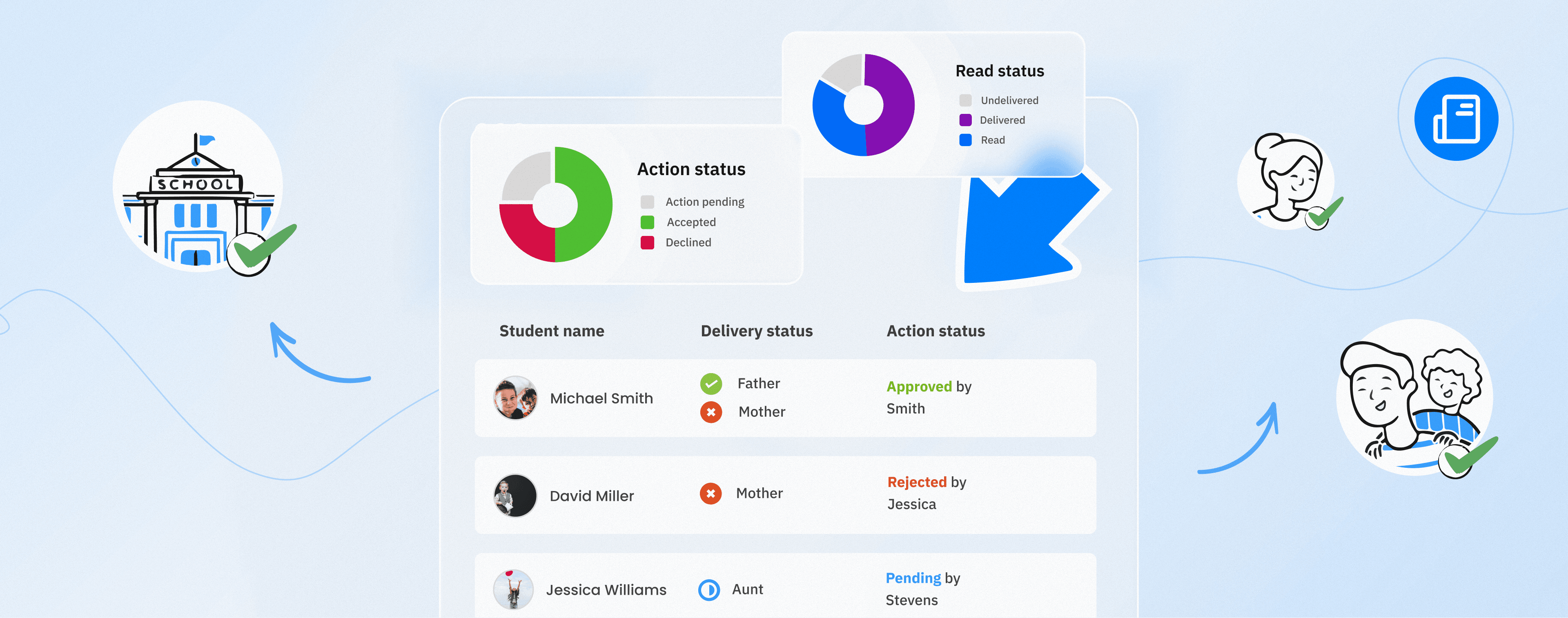
At its simplest, it delivers announcements and messages. An app that can genuinely manage communication goes further: it collects consent, receives absence notes, distributes documents specific to each student, handles routine questions, and shows who received each message, who read it, and who took the action it asked for.
And the word "app" is not a minor detail here.
A parent is unlikely to log into a web portal every day, or to check their email continuously. But they will almost always open a notification that arrives directly on their phone.
So any solution that depends on parents remembering to visit a platform or portal will deliver less than expected, however convincing its features looked during the demo.
Plenty of digital tools get described as "school software", but a real school app succeeds when it makes communication a natural part of a parent's daily routine rather than an extra task they have to remember.
7 criteria that separate a school app from a messaging tool
1. Interactive messages that ask for a response, not just deliver information
Most tools can send messages. Few can collect the replies and the actions in an organised way.
The important question is not whether the message arrived. It is what a parent can do after receiving it.
Can they approve their child joining a trip? Confirm they have read a school policy? Submit a reason for an absence? Or reply directly from inside the message itself?
An app that only broadcasts information leaves the follow-up burden on staff, forcing them to chase replies by hand across calls, messages, and separate lists.
2. Proof of delivery, reading, and action
Every message should let the school see:
- Who received it.
- Who read it.
- Who responded to it.
- Who took the action required.
- The status of each student individually.
Without that information, "we informed the parents" becomes an assumption rather than a documented record you can go back to.
Ask as well about exporting reports in formats such as PDF or CSV. A regulator or a board may need that record, and it can become essential in a disagreement with a parent over an earlier message or approval.
3. Privacy that holds even after a staff member leaves
Many tools fail this test.
When teachers and parents communicate using their personal phone numbers, the school is no longer fully in control of the relationship or the record of it. And when a staff member leaves, parents' contact details and conversations may stay saved on their personal device.
So ask clearly:
- Are personal phone numbers shared at any stage?
- Where are the conversations stored?
- What happens to a staff member's access when they leave the school?
- Can management oversee communication when there is a genuine need?
What you want is a communication space that stays under the school's control, without exposing personal numbers, with clear permissions and appropriate oversight mechanisms.
4. Review of messages before they reach families
Every message sent in the school's name affects its image and reputation.
So the app should let you decide which staff can send directly, and whose messages must go through review before publication.
The reviewer should also be able to:
- Approve the message.
- Reject it.
- Return it to the sender with feedback.
- Check the date, the content, the attachments, and the intended audience.
Some smaller schools skip this step at first, then recognise its importance quickly after a message goes out with the wrong date, to the wrong group, or in unsuitable wording.
5. Reaching the families who are hardest to reach
In every school there is a group of parents who may not install apps, who change their numbers, who work shifts, or who do not open messages immediately.
Ask the vendor how the app handles these cases.
One effective approach is an automatic SMS fallback sent only to the parents who have not seen an urgent message inside the app.
That way the school pays for the exceptions rather than sending an SMS to every parent every time.
6. Multilingual support that matches your families
In most schools across the Middle East and North Africa, not all parents use the same language.
So ask about:
- The number of languages the parent app supports.
- The language of the interface itself.
- Whether messages can be translated.
- Whether translation works inside the conversation itself.
- Whether translation is available to both sides, or only at the point of sending.
Translation should not be limited to preparing a separate version of a message before sending it. It is far better for a parent to be able to read and engage with the content in whichever language suits them.
7. Integration that works alongside your student information system
Your student information system holds the core records for students, classes, and parents.
So a school app should draw its data from that system rather than trying to replace it, or forcing staff to maintain and update two separate lists by hand.
Ask the vendor about:
- Which systems the app integrates with.
- How student and parent data is synchronised.
- How often the data refreshes.
- The realistic time needed to go live.
- Whether there are extra fees for integration or data migration.
And if the answer involves a separate data-migration project, its duration and cost belong in the purchasing decision.
Questions worth asking before you sign
What share of our parents can we realistically reach?
A platform parents do not use is not an effective communication channel. It is an additional technology cost.
Ask the vendor for a realistic usage rate at schools similar to yours, not the best result they achieved in an exceptional case.
Who can see a teacher-parent conversation, and when?
This is a question of governance and privacy.
What you want is neither every conversation open to every staff member, nor a complete absence of oversight, but a clear process defining who can look, in which cases, and with what authority.
What happens to our data if we end the subscription?
Agree from the outset on data ownership, how it is exported, which formats are available, and how long it is retained after the subscription ends.
Negotiating an export right before signing is far easier than trying to obtain it after the contract has ended.
What does onboarding include?
Onboarding is not limited to creating accounts and importing data.
Ask whether it includes:
- Staff training.
- Setting up user permissions.
- Introductory materials for parents.
- Launch support for the app.
- Help raising installation and usage rates.
- Technical support after launch.
How onboarding is handled often decides whether staff and families actually adopt the app.
What is the total first-year cost?
Per-student cost, setup fees, integration, SMS, training, and add-ons may all be quoted separately.
So ask for one clear figure covering the total first-year cost, then compare solutions on that basis.
What your students' families get
The school is the party that buys the app, but its real value shows up on a parent's phone.
A parent opens one app and finds the trip consent form, a fee reminder, and a photo from this morning's science lesson, all in the language they prefer.
And one tap is enough to reply or take the action required.
No group chats running until 11pm, no forwarded screenshots, no messages lost between channels, and no confusion over whether a notification concerns their own child.
For a parent working shifts who cannot take a call during the school day, that single tap can make a genuine difference between taking part in school life and being absent from it.
Informed families also need fewer enquiries at the front desk, engage more with activities and events, and build a stronger relationship with the school. That is how a benefit for the parent turns into a tangible return for the school itself.
Where Schoolvoice fits
Schoolvoice was designed around these criteria.
Actionable Messages let a parent complete the required action in one tap, so a request comes back to the school with a completed answer rather than just proof of delivery.
Reports show:
- Who received the message.
- Who read it.
- Who took the action required.
- The status of each student individually.
And that information can be exported whenever a documented record is needed.
Teachers and parents communicate without exchanging personal phone numbers, while a staff member's access ends when their school account does.
Approval workflows allow messages to be reviewed before they go out in the school's name, while automatic fallback SMS helps reach the parents an app alone might not.
On average, schools reach about 86% of parents through Schoolvoice, roughly 86 parents in every 100. Many schools reach 100%, meaning every parent registered with them.
The parent app supports 8 languages, so families can use it in whichever suits them best, alongside translation inside conversations.
Schoolvoice also integrates with PowerSchool, OneRoster, Excel and ADEK's eSIS, working alongside your student information system rather than replacing it.
Hundreds of schools and thousands of families across 16 countries, in a wide range of educational settings, use Schoolvoice as their official channel for communication between school and parents.
And the platform is available to schools free of charge, including onboarding and staff training.
If your staff are still following up on replies by hand, read our guide to reducing teacher workload to see which tasks can be automated first.
And for a closer look at the evaluation and comparison steps themselves, read our guide on how to pick the best school communication app.
Want to assess Schoolvoice against your own school's needs? Book a demo and test the platform with the hardest question on the list above.